
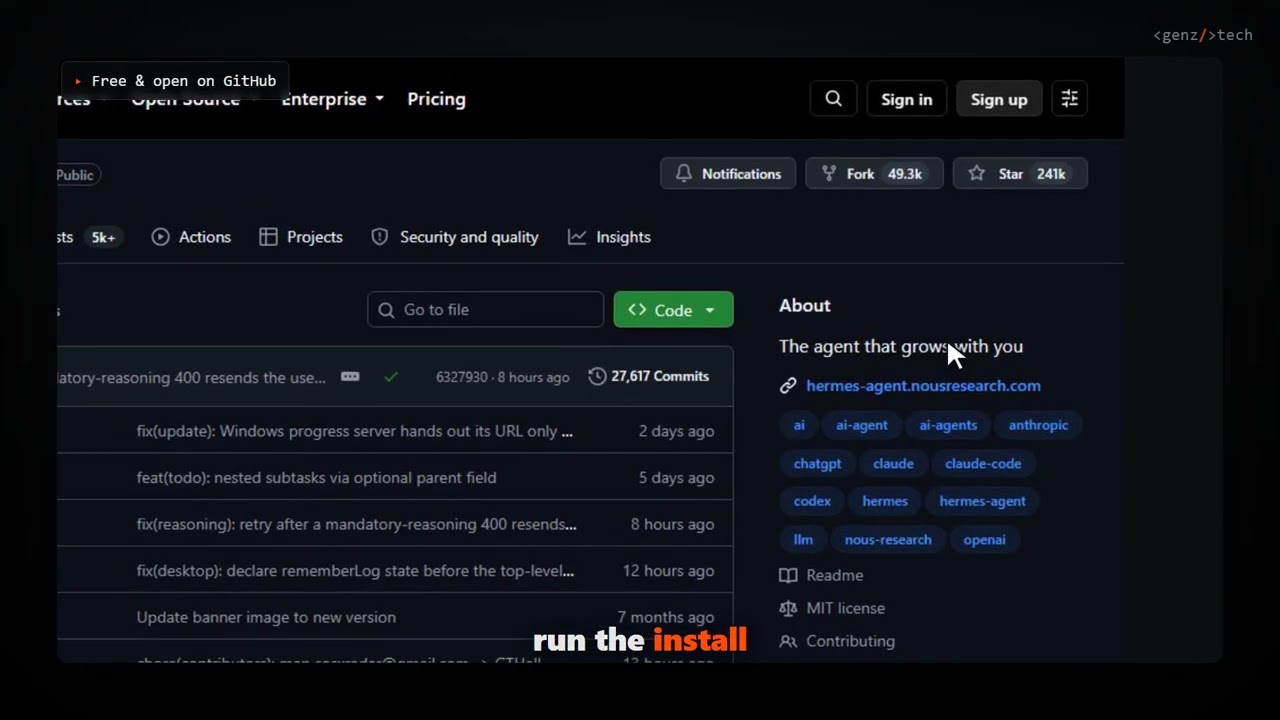
Hermes Agent is a free, open source AI agent from Nous Research that writes and improves its own skills as it works, remembers context across sessions, and runs from a terminal, a $5 VPS, or straight from Telegram. It has crossed 240,000 GitHub stars and added more than 750 of them today alone, putting it near the top of GitHub's daily trending page.
\n- \n
- Hermes installs with one command on Windows, macOS, Linux, WSL2, and even Termux on Android; the installer bundles Python, Node.js, ripgrep, and ffmpeg for you. \n
- It runs anywhere, not just your laptop: locally, in Docker, over SSH, or on serverless infrastructure like Modal and Daytona that hibernates when idle, and you can talk to it from Telegram, Discord, Slack, WhatsApp, or Signal, not only a terminal. \n
- A built-in learning loop lets it create and refine its own skills from experience, search its own past conversations, and build a persistent model of who you are across sessions. \n
- It is provider-agnostic: bring your own OpenAI, Anthropic, or OpenRouter key, or skip API keys entirely with a free Nous Portal login. \n
The exact steps, start to finish
\n- \n
- Step 1. Check your machine is ready.\n
\nHermes needs Windows 10/11, macOS, Linux, or WSL2, and roughly a few hundred MB free before its installer pulls down its own managed Python, Node, and tool binaries. No manual toolchain setup is required; the installer handles that next.# Windows PowerShell: confirm version and free disk space\n$PSVersionTable.PSVersion\n[System.Environment]::OSVersion.Version\nGet-PSDrive C | Select-Object Used,Free\n - Step 2. Run the one-line installer.\n
\nThis single PowerShell command installs everything Hermes needs (uv, Python 3.11, Node.js, ripgrep, ffmpeg, and a portable Git Bash) with no admin rights required. On Linux, macOS, or WSL2 the equivalent is a shell one-liner covered in the install section below.$ iex (irm https://hermes-agent.nousresearch.com/install.ps1)\n - Step 3. Open a new PowerShell window. The installer updates your PATH, and a fresh terminal picks that up cleanly rather than fighting with the shell session the installer ran inside. \n
- Step 4. Connect a model provider, free, no API key.\n
\nThis opens a browser to portal.nousresearch.com for a free OAuth login, sets Nous Portal as your provider, and turns on its Tool Gateway (web search, image generation, TTS) in one step. No API keys to copy anywhere. If you'd rather bring your own OpenAI, Anthropic, or OpenRouter key instead, run$ hermes setup --portalhermes modeland pick it from the interactive list. \n - Step 5. Verify the install.\n
\nThis checks your config, provider auth, and installed tools, and flags anything still missing before you rely on it for real work.$ hermes doctor\n - Step 6. Have your first real conversation.\n
\nThen ask it something concrete and easy to verify, straight from the project's own quickstart: "Summarize this repo in 5 bullets and tell me what the main entrypoint is." A working setup shows your chosen model in the welcome banner, replies without error, and can keep the conversation going for more than one turn.$ hermes --tui\n
What is Hermes Agent and why is it trending?
\nHermes Agent is Nous Research's self-improving AI agent, built in Python and MIT licensed, with more than 240,000 GitHub stars and 49,000 forks. Under the hood it is two things: a full terminal interface (a classic CLI plus a newer TUI with multiline editing, slash-command autocomplete, and streaming tool output) and a messaging gateway that connects the same agent to Telegram, Discord, Slack, WhatsApp, Signal, and email from a single process. What sets it apart from a typical wrapper around a chat model is the "closed learning loop": Hermes curates its own memory with periodic nudges to persist what it learns, creates skills automatically after complex tasks, improves those skills as it reuses them, and runs full-text search over past sessions to recall relevant history. It also supports scheduled cron automations delivered to any connected platform, and can spawn isolated subagents to parallelize multi-step work. The latest release, v0.21.0 (tagged v2026.8.31), shipped August 31, 2026.
RelatedOpenCode Setup: Install the Open-Source AI Coding Agent
\nHow do you install Hermes Agent on Windows, macOS, and Linux?
\nEvery platform uses the same one-line-installer pattern; only the shell changes. On Windows, run the checklist's PowerShell command above, or download the Hermes Desktop installer from the project's site for a combined CLI-plus-desktop-app install. Native Windows runs Hermes without WSL: CLI, gateway, TUI, and tools all work directly, and the installer drops a portable, isolated MinGit build if you don't already have Git.
\nOn Linux and macOS (including WSL2 and Termux on Android), the installer is a single curl command:
\n# Linux, macOS, WSL2, Termux\ncurl -fsSL https://hermes-agent.nousresearch.com/install.sh | bashReload your shell afterward so the new PATH entries take effect:
\nsource ~/.bashrc # or: source ~/.zshrcThen start it the same way on every platform:
\n$ hermes # start chatting!Android users on Termux should follow the project's dedicated Termux guide, since the full extras bundle pulls in voice dependencies that aren't Android-compatible; Termux installs a curated subset instead.
RelatedStrix Setup: Run an AI Penetration Tester on Your Code
\nHow does Hermes Agent compare to other AI agent tools?
\n| Trait | Hermes Agent | OpenClaw | ChatGPT / Claude apps |
|---|---|---|---|
| Where it runs | Local, Docker, SSH, or serverless (Modal, Daytona) | Local machine only | Vendor's cloud, browser or native app |
| Model choice | 300+ models via any provider, switch anytime with hermes model | Configurable, narrower provider list | Locked to that vendor's own models |
| Memory across sessions | Built-in, agent-curated, with full-text session search | Basic memory files | Limited, vendor-controlled memory feature |
| Messaging platforms | Telegram, Discord, Slack, WhatsApp, Signal, Email from one gateway | Not built in | Usually one app or web chat only |
| Skills | Self-writes and improves its own skills; open Skills Hub | Manual skill files | No user-authored skill system |
Hermes even ships a one-command migration path for people coming from OpenClaw (hermes claw migrate), importing its persona file, memories, skills, and API keys automatically. Against a closed chat app, the tradeoff is the usual local-agent one: more setup, in exchange for owning the runtime, the model choice, and where your data actually goes.
What are the gotchas before you rely on it?
\nA few things worth knowing before you build a routine around it. First, Hermes runs real shell commands on your machine when it uses its terminal tool; for anything beyond casual local use, set up command approval or run it sandboxed with hermes config set terminal.backend docker. Second, its GitHub issue tracker is large and active (north of 39,000 open issues against 240,000+ stars), a sign of a genuinely fast-moving project more than a broken one, but still worth checking before you lean on an edge-case feature. Third, some antivirus tools (Windows Defender, Bitdefender) flag the bundled uv.exe Python package manager as a false positive; the project's README documents an attestation-based way to verify the binary and whitelist the folder if that happens to you. Fourth, if you point Hermes at a local or self-hosted model instead of a hosted provider, it requires at least 64,000 tokens of context, smaller windows get rejected at startup because multi-step tool-calling needs that much working memory.
- \n
- Skills Hub growth. Hermes is compatible with the open agentskills.io standard; how many third-party skills show up there decides how much of the "self-improving" pitch is community-built versus agent-authored. \n
- Serverless terminal backends. Modal and Daytona support is new and offers near-zero idle cost; watch whether SSH, Docker, and Singularity users migrate once it's proven out. \n
- Nous Portal adoption. The free-OAuth, no-API-key onboarding path is the easiest one in the table above; whether it becomes the default for new users will say a lot about where Nous Research wants the funnel to go. \n
Our take
\nThe individual pieces of Hermes Agent, a terminal chat client, a messaging bot, cron jobs, MCP support, aren't new ideas on their own. What makes it worth the ten-minute setup is that Nous Research bundled all of them behind one install command and one config file, then added a memory and skills layer that actually tries to get better at your specific workflow instead of resetting every session. The free Nous Portal path removes the usual first-hour friction of collecting five API keys before you can even say hello, and the OpenClaw migration path suggests Nous is actively courting people already running a similar setup elsewhere. The real test is the one the project's own docs are honest about: if it can't hold a normal conversation cleanly, don't bother layering on the gateway, cron, or skills yet. Get one clean chat working first. Everything else here builds on that.
\n- \n
- OfficialNousResearch/hermes-agent repository and README \n
- OfficialHermes Agent Releases v0.21.0 / v2026.8.31 changelog \n
- OfficialHermes Agent Quickstart install, provider setup, and first-chat walkthrough \n
- ReferenceNous Portal free OAuth model provider used in this tutorial \n
Original analysis by GenZTech. Tool documentation: NousResearch/hermes-agent on GitHub.
\n