
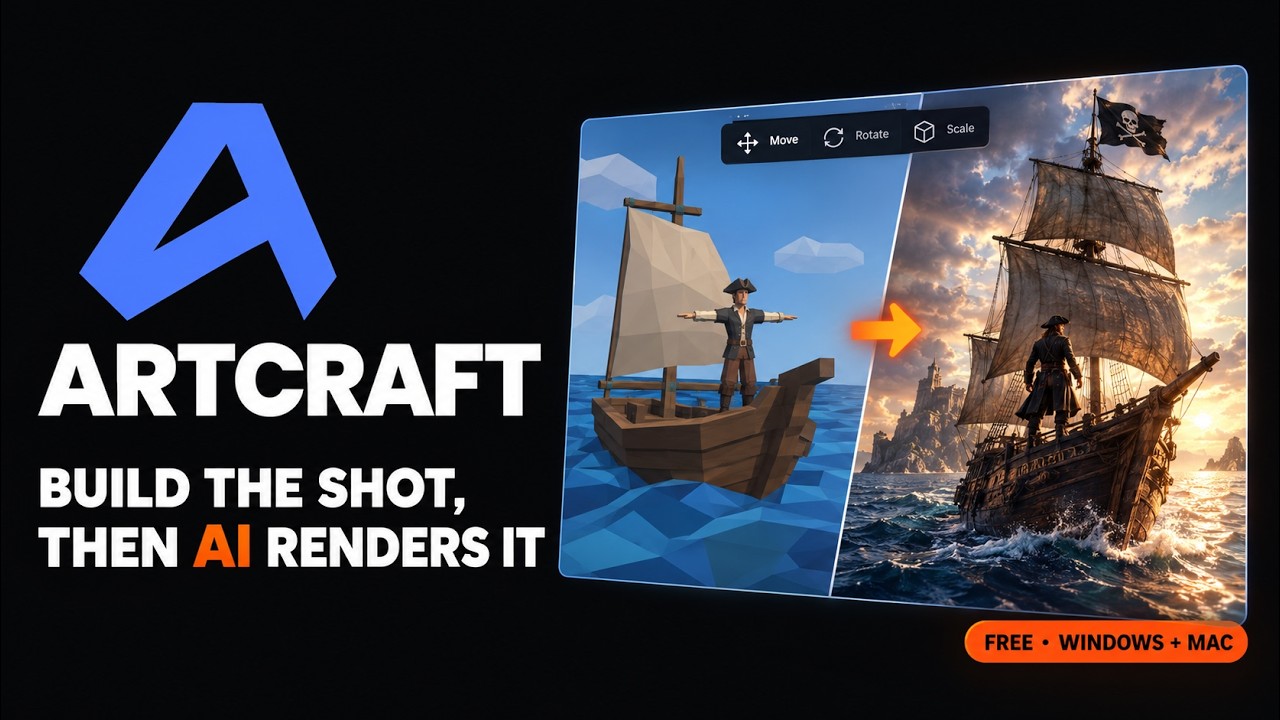
ArtCraft is a free desktop app for Windows and macOS that turns AI image and video generation into scene building: you block out a shot with 2D layers, 3D props, posed characters and a camera, then let a model render it. The repo from storytold picked up 2,103 GitHub stars in a single day on October 9, 2026, taking it past 8,200, and the installer takes about five minutes to get running.
The pitch is aimed squarely at people who are tired of rerolling prompts. Instead of describing "a woman on the left, a ship behind her, low angle" and hoping, you put the ship there, pose the figure and set the camera yourself. The model only fills in the look.
RelatedAIRI Setup: Self-Host Your Own AI Companion in 15 Minutes
- The app is free, the generations mostly are not. ArtCraft's own models run on credits (the Basic plan lists 1,000 a month), though you can also connect Grok and Midjourney accounts you already pay for.
- Version 0.41.0 is current. It shipped on September 26, 2026 as a 39.9 MB Windows installer, a 44.7 MB MSI and a 90.5 MB universal macOS DMG.
- 62 models sit behind one interface, covering images, video, music, 3D meshes and Gaussian splat worlds, from Nano Banana and Seedance to Hunyuan 3D and Marble.
- It is "fair source", not OSI open source. You can read, build and use the code free, but the license bars selling it or building a competing product from it.
The exact steps, start to finish
- Check your machine. ArtCraft wants 64-bit Windows 10 or newer (or macOS 12+), 8 GB of RAM and about 2 GB of free disk.
# Windows (PowerShell or cmd) systeminfo | findstr /C:"OS Name" /C:"System Type" /C:"Total Physical Memory" # macOS sw_vers -productVersion - Download the installer. Grab
ArtCraft_0.41.0_x64-setup.exe(Windows) orArtCraft_0.41.0_universal.dmg(Mac) from the GitHub releases page, or press Download on getartcraft.com/download. - Install it. Run the setup file on Windows, or open the DMG and drag ArtCraft into Applications on a Mac.
- Create a free ArtCraft account. The app asks you to sign in on first launch. Sign up inside the app or at app.getartcraft.com; the account itself costs nothing.
- Pick how you will pay for generations. Either buy ArtCraft credits on the pricing page, or open the app's settings and, in the account section, connect a Grok or Midjourney account you already have.
- Generate your first image. Choose Create, then Image, type a prompt such as "a lighthouse on a cliff at dusk, wide shot", leave the model on Nano Banana 2, and press the send arrow.
- Turn it into a scene. Open Edit 3D, drop the image in as a backdrop, add a 3D object or a posed character in front of it, frame the camera, and render the shot.
Installing the ArtCraft desktop app on Windows 10 and 11
There is no package manager route in the docs, so Windows users take the installer straight from the releases page. Two flavours ship with every build: the 39.9 MB x64-setup.exe, which is what most people want, and a 44.7 MB .msi that suits IT-managed machines where MSI deployment is the norm. Both are x64 only. The download page lists 64-bit Windows 10 or newer, 8 GB of RAM and 2 GB of free storage as the baseline.
Nothing heavy runs on your GPU. ArtCraft is a Rust and Tauri shell; the actual image and video models run on remote providers, which is why an 8 GB laptop is enough.
ArtCraft on a Mac, or no install at all in the browser
The macOS build is a single universal DMG at 90.5 MB, so the same file covers Apple Silicon and Intel Macs running macOS 12 or later. A .app.tar.gz of the same build sits alongside it for anyone scripting installs.
If you only want to look around first, app.getartcraft.com runs the same interface in a browser. We opened it signed out: the full sidebar loads (Create, Studio tools such as Edit 3D and BG Change, the asset Library), and the Create Image page shows the prompt box with Nano Banana 2 preselected. In place of a working generate button, the page shows Sign up to create. The best demo is Edit 3D: it offers example scenes, and picking Black Sails loads a low-poly boat, water and a T-posed character on a 3D stage, with the finished cinematic render that was generated from that rough layout pinned in the corner. That one screen explains the product better than the marketing copy does. Linux has no prebuilt package; the README points Linux users at building from source.
Do you have to pay to generate anything in ArtCraft?
Usually, yes, but not necessarily to ArtCraft. Its own hosted catalog runs on credits. At the time of writing the pricing page lists Basic at $10 a month for 1,000 credits (about 250 Nano Banana images by its own estimate), Pro at $35 for 3,750 and Max at $60 for 6,600, with a limited-time 20% discount on top and one-time credit packs that never expire. Credits for a generation that fails are refunded.
The alternative is connecting accounts you already pay for. The account settings pane in the app's source has separate blocks for your ArtCraft login, Grok and Midjourney, and the README also lists Sora and World Labs' Marble among supported providers. The pricing page's own footnote says the app works without a subscription if you bring your own compute and third-party subscriptions. The company says Kling, Google, Runway and Luma integrations are planned, plus support for aggregator subscriptions like OpenArt and Freepik.
Building ArtCraft from source with Rust and Tauri
Building yourself makes sense on Linux, or if you want to poke at the code. The dev setup guide asks for Rust, Node.js (it notes v24.13.0 works) and the Tauri CLI (2.10.0 works). On Windows the frontend and the Rust app start from two separate PowerShell scripts in the repo root, each in its own terminal:
# PowerShell, terminal 1: frontend dev server (runs npm install, then nx dev)
.\script\artcraft\windows_frontend_dev.ps1
# PowerShell, terminal 2: the Tauri Rust app
.\script\artcraft\windows_rust_dev.ps1

:: cmd.exe equivalent
powershell -File script\artcraft\windows_frontend_dev.ps1
powershell -File script\artcraft\windows_rust_dev.ps1
On macOS and Linux one launcher starts both halves and hunts for a free port from 5193 upward:
RelatedMeetily Setup: Free Local AI Meeting Notes in 10 Minutes
$ ./script/artcraft/unix_dev.sh
# optionally start the port search somewhere else
$ ARTCRAFT_DEV_PORT=6200 ./script/artcraft/unix_dev.sh
# type-check the Rust side without a database server
$ SQLX_OFFLINE=true cargo check -p artcraft
Expect a big frontend install. The frontend folder is an Nx monorepo, and on our Windows 10 test machine its npm install added 1,598 packages in about four minutes, with a long run of deprecation warnings (eslint 8, glob 7 and 10, uuid 9 and 10) and an npm audit count of 82 known vulnerabilities across the dependency tree. None of that stopped the install, but it is a reason to keep a source build off machines that hold anything sensitive. Running the frontend on its own (npx nx dev artcraft, the second half of the Windows frontend script) brought Vite up on port 5173 in under a second, and the first screen was the same Create your account form the installed app shows on first launch.
Fixing "Filename too long" when cloning ArtCraft on Windows
This is the first wall a Windows builder hits. A plain clone downloads fine and then fails on checkout:
fatal: cannot create directory at 'crates/api_clients/artcraft/artcraft_router/src/generate/generate_audio/providers/artcraft/seed_audio_1p0': Filename too long
warning: Clone succeeded, but checkout failed.
Some Rust crate paths run past Windows' default 260-character limit. Turning on Git's long-path support for that one clone fixed it for us, and a shallow clone keeps the download small (about 97 MB on disk):
$ git -c core.longpaths=true clone --depth 1 https://github.com/storytold/artcraft.gitCloning into a short folder like C:\src also helps. Two other notes from the scripts themselves: the Windows frontend script warns that if Vite is not on port 5173 you may have a zombie process holding it, and it suggests clean_modules.sh when dependencies get into a bad state.
ArtCraft next to OpenArt, Freepik and ComfyUI
| ArtCraft | OpenArt | Freepik AI | ComfyUI | |
|---|---|---|---|---|
| Source code | Public, fair-source license | Closed | Closed | Open source (GPL-3.0) |
| Where it runs | Desktop app plus web | Browser | Browser | Local, on your GPU |
| How you work | Canvas and 3D scene, then render | Prompt-driven tools | Prompt-driven tools | Node graph |
| Who pays for compute | ArtCraft credits or your own Grok/Midjourney | Site credits | Site credits | Your hardware |
| Setup effort | Installer plus account | Account only | Account only | Python, models, a capable GPU |
Our view: ArtCraft earns the install if your frustration with AI art is composition, not quality. The scene tools (posing a mannequin, dropping a mesh where you want it, locking the camera) solve a problem prompt boxes keep failing at, and you can test them on the web app before installing anything. If what you want is free, fully local generation, ComfyUI is still the answer, because ArtCraft's models run on remote providers. And treat the license honestly: it is source-available with commercial limits on the software, even though the images and videos you make are yours.
- Repostorytold/artcraft on GitHub README, model catalog, provider list
- ReleasesArtCraft releases v0.41.0 installers and sizes
- DocsDev setup guide Rust, Node and Tauri requirements, launch scripts
- Officialgetartcraft.com download page system requirements and quick start
- PricingArtCraft pricing credit plans and bring-your-own footnote
- LicenseArtCraft License (WIP) fair-source terms
- DependencyTauri 2 the desktop framework ArtCraft is built on