
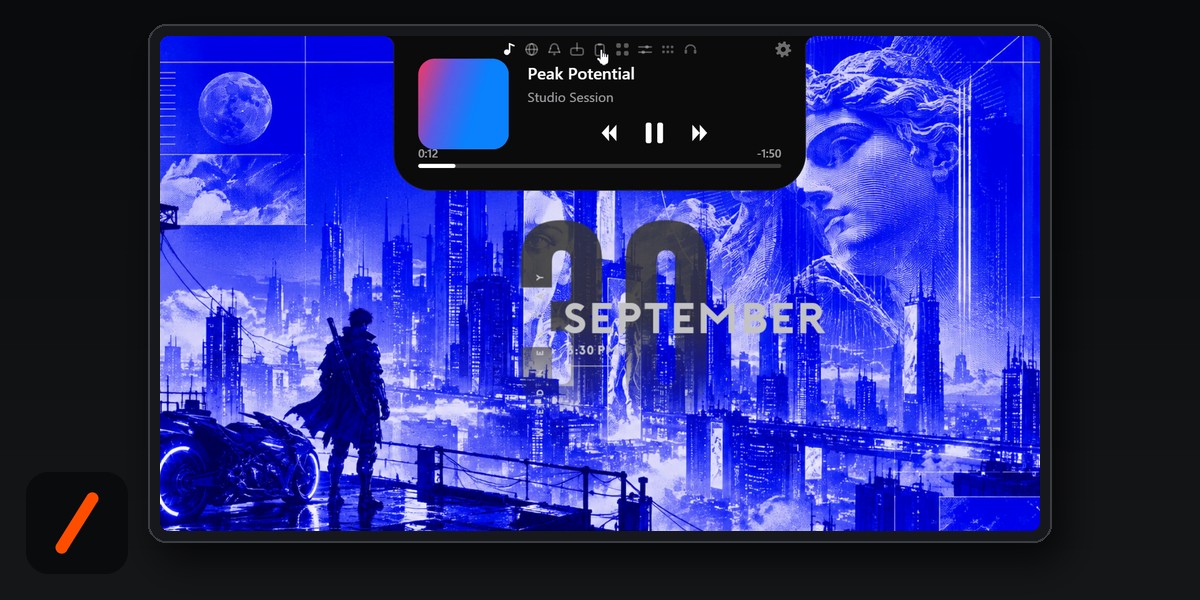
To get a notch on Windows 11 or Windows 10, install NotchPixel from the Microsoft Store. It puts a small pill at the top centre of your screen that opens into a card when you rest the pointer on it: what is playing, your volume and brightness, a shelf for files, a call timer and mute key, and a stats strip in fullscreen games. It runs on Windows 10 version 2004 or later and on Windows 11 (x64), costs $9.99 once after a 7-day free trial, and needs no account. One thing to know up front: NotchPixel is made by Kore Industries, the company that also publishes GenZTech, so this is a guide to our own app. Every number below links to the page it comes from, so you can check it.
- NotchPixel 0.5.67 is the current Microsoft Store build (Store ID 9MXCRL0XBGPH, publisher KORE INDUSTRIES), checked on October 8, 2026.
- Price: a 7-day free trial in the Store, then $9.99 once in the US. No subscription and no account.
- Footprint: 12.8 MB in Task Manager's Memory column and 0% CPU at idle, measured over 120 seconds on version 0.5.64 on October 3, 2026, with the script published so you can rerun it.
- Ctrl+Alt+M mutes your microphone in every app at once, because it mutes the microphone in Windows itself.
- Files go to your phone by QR code over the same Wi-Fi, with nothing to install on the phone.
How do I get a notch on Windows 11?
Setup takes about two minutes and every step happens in the Microsoft Store or on the notch itself:
RelatedThis Student Built a Media Server That Never Touches Your Data Plan
- Open NotchPixel in the Microsoft Store and choose the free trial. The Store handles the licence, so there is no key to copy and no sign-up.
- Launch it. The notch appears at the top centre of your main screen. On a laptop with no camera cut-out it draws its own pill, so it looks the same on any display.
- Rest the pointer on the notch for a moment. It opens into a card; move away and it closes. It never takes your clicks, so whatever sits under it on screen stays usable.
- Follow the short first-run tour, then use the icons along the top of the card to switch tabs. Ctrl+Alt+N opens the card from the keyboard.
- Right-click the tray icon and open Settings to pick the shape, the size, the theme and the shortcuts.
That is the whole install. There is no driver, no service and no browser extension, and uninstalling it from Windows Settings removes it like any other Store app.
Does NotchPixel work on Windows 10?
Yes. The Store listing requires Windows 10 version 2004 (build 19041) or later, or Windows 11, on an x64 PC. The footprint figures in this guide were measured on Windows 10 Home 22H2, not on Windows 11, so Windows 10 is a first-class target rather than an afterthought. If Windows Update has kept your PC current, you are above build 19041 already; type winver into the Start menu to check. ARM laptops are not on the requirements list.
What does the notch show at the top of the screen?
The idle pill is small on purpose. It changes when something happens, and each change opens into a fuller card when you point at it. These are the jobs it does, where to find each one, and the condition that applies:
| What you want | Where it lives in NotchPixel | Shortcut or condition |
|---|---|---|
| Control music without finding the window | Now playing card: artwork, play, pause, skip, scrub | Any app or browser tab that reports to Windows media controls |
| Replace the volume and brightness pop-up | Volume, brightness, battery and headphone pop-ups at the top centre | Takes over from the Windows flyouts |
| Mute your mic in every app | Calls tab, plus a call timer on the notch while the mic is in use | Ctrl+Alt+M |
| Send a file from PC to phone | File shelf, then Send to phone and a QR code | Same Wi-Fi, network set to Private |
| FPS, CPU, GPU and RAM while gaming | Slim stats strip in fullscreen | Borderless or windowed fullscreen; one-time Windows permission |
| Clipboard history that survives a restart | Clipboard tab, with pinned lines | Password-manager copies are skipped |
| Twitch or YouTube chat on one monitor | Chat drawer | Stays open beside a fullscreen game |
| See that OBS is recording | REC or LIVE pill with the elapsed time and scene | OBS Studio's own WebSocket server |
| Copy a colour from anywhere on screen | Colour picker | Ctrl+Alt+C copies the hex code |
Around those sit the smaller pieces: Wi-Fi, Bluetooth, night light, focus assist and power-mode switches, screenshots, snips and screen recording, six slots for your favourite apps (each with its own optional shortcut that works from inside a fullscreen game), the date, your next events, the weather, a focus timer, and a dot on the notch while the microphone, the camera or a screen capture is live. Your Windows notifications are mirrored on the notch and kept in one list. A lyrics drawer can show the words for the song that is playing; it looks them up in LRCLIB, a free community lyrics library, only when you turn lyrics on.
How do I send files from my PC to my phone with the notch?
Drag the file onto the notch and let go. It waits on the shelf, which is useful by itself: you can go and open the right folder, then drag the file back out into any app. To move it to your phone, click Send to phone and scan the QR code with the phone's camera. The file opens in the phone's browser. Nothing gets installed on the phone and nobody signs in, which is why it works the same on an iPhone and on Android.
Two conditions decide whether it works. Both devices have to be on the same Wi-Fi, and Windows has to treat that network as Private, not Public; you change it in Windows Settings under Network and internet, on your Wi-Fi connection's properties. On a Public network Windows blocks the local connection the phone needs. Transfers also run the other way: photos, files and text from the phone land on the PC.
How do I mute my microphone in every app with one key?
Press Ctrl+Alt+M. Mute buttons inside a calling app only mute you in that app, so a second app that has the mic open can still hear you. NotchPixel mutes the microphone in Windows itself, so every app gets silence at once, and pressing the key again brings it back. While any app is using the microphone, a call timer runs on the notch, so you can see at a glance that a call is live and whether you are muted. The Calls tab adds the mute switch, a picker for your speaker and microphone, and a camera mirror for a quick look before you join. The shortcut can be changed in Settings if Ctrl+Alt+M clashes with something you already use.
Can NotchPixel show FPS over a fullscreen game?
Yes, with one setting to get right. In a fullscreen game the notch either steps aside or turns into a slim strip with your frame rate, CPU, GPU and RAM. Reminders you set still appear over the game, and the chat drawer can stay open next to it. Set the game's display mode to borderless or windowed fullscreen: in exclusive fullscreen, Windows lets nothing draw over the game, so no overlay of any kind can appear there.
The frame rate comes from Windows' own frame events. Nothing is injected into the game process, which matters if you play titles with anti-cheat, and the first time you turn the strip on Windows asks for a one-time permission to read those events.
RelatedMicrosoft's Project Zenith Reboots Windows for AI Developers
Does NotchPixel slow down a PC?
The published measurement says no. On version 0.5.64, idle for 120 seconds on a laptop with an Intel Core i5-11400H and 15.7 GB of RAM running Windows 10 Home 22H2, NotchPixel used a median of 12.8 MB in Task Manager's Memory column and 0.63% of one CPU core, which is 0.05% of the whole PC and shows as 0% in Task Manager. The footprint page also lists the bigger counters, such as the 29.7 MB median working set including shared pages and 336.5 MB of committed memory that is mostly graphics buffers reserved by Direct3D rather than RAM in use, and it publishes the script so you can measure your own copy the same way. Numbers move between versions, which is why each one is quoted with its version and date.
Is NotchPixel free?
It is free for 7 days. The Microsoft Store offers a trial, and after it NotchPixel costs $9.99 once in the US, with the Store showing the local price in other countries. There is no subscription and no account. When the trial ends without a purchase, the notch's own actions grey out and Settings stays open, so nothing breaks on your desktop. What the $9.99 pays for is the work beyond the look: the FPS strip and reminders over games, the one-key mute with a call timer, files to your phone with nothing installed on it, the chat drawer and the OBS pill.
Is NotchPixel the iPhone's Dynamic Island for Windows?
It takes the idea, not the product. On the iPhone, Apple calls the live area around the camera the Dynamic Island. NotchPixel brings a similar pill to a Windows PC, where there is no camera cut-out, so it draws its own. It is not made, endorsed or sponsored by Apple, and Dynamic Island is a trademark of Apple Inc. If you came here searching for "dynamic island for Windows" or "dynamic island for PC", this is the kind of app you were looking for.
Can I make it a floating island instead of a notch?
Yes. In Settings you can keep a notch that hangs from the top edge or switch to an island that floats just below it, at any size and corner roundness, with themes. A rule per app decides what the notch does over that app: keep the full pill under a maximized window, slim it down, or hide it. You can also keep it hidden until you rest the pointer on the top edge, with an open delay you choose, and every action has a keyboard shortcut you can change.
What does NotchPixel do with my data?
Very little leaves the PC. There is no account, no telemetry and no ads. Clipboard history is stored encrypted for your Windows account, and copies from password managers are skipped. Notifications are read only after you allow access in Windows, and they never leave the PC. The microphone permission covers the call timer and the mute key, the webcam is used only when you open the mirror, and location is used only for the weather if you choose Use my location. The two features that reach the internet are ones you switch on: the weather and the lyrics lookup.
For developers there is one more door, and it stays on your machine: any program on the PC can put a line on the notch or a live tile in the card through a local address only that PC can reach, or from the command line. A finished build, a failed test or a coding agent that has stopped can announce itself at the top of the screen.
- OfficialNotchPixel in the Microsoft Store : price, trial, requirements, permissions, version 0.5.67 (checked October 8, 2026)
- Officialnotchpixel.com : features, 7-day trial and pricing
- MeasurementNotchPixel memory and CPU, measured : the 12.8 MB and 0.63%-of-one-core figures, with the script
- GuideSend files from PC to phone : the shelf and QR transfer in more detail
- GuideMute your microphone in Windows : the system-wide mute key
- PrivacyNotchPixel privacy policy : what is stored and what leaves the PC