
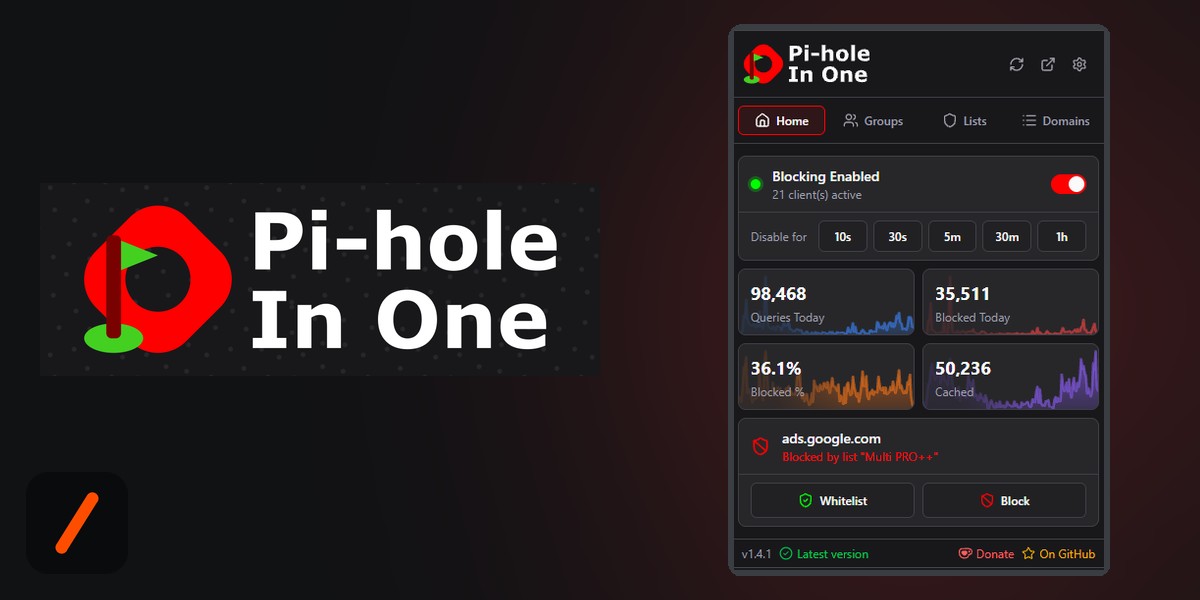
Pi-hole In One is a free browser extension that puts the controls of a Pi-hole, the popular network-wide ad blocker people run at home, into a one-click popup in Chrome, Firefox or Edge. When a site breaks because Pi-hole blocked something it needed, you can see which domain was blocked and allow it right there, or pause blocking for 30 seconds, instead of logging in to the admin panel. It is built by a student developer who goes by Creeperkatze, and it has shipped 30 releases since April 2026.
- One click to pause Pi-hole for 10 seconds up to an hour, after which blocking turns itself back on.
- The popup shows whether the site you are on is blocked, by you or by a list, and allowlists or blocks it instantly.
- It handles multiple Pi-holes, groups, blocklists, regex rules and live stats, and is translated into 29 languages.
- It is open source under AGPL-3.0, with more than 500 users across the Chrome and Firefox stores.
What does Pi-hole In One do?
"Pi-hole In One is a browser extension to control your Pi-hole conveniently without opening the admin panel," Creeperkatze told us. Pi-hole blocks ads and trackers for every device on a home network by refusing to resolve their domains, which is great until a site you actually want depends on one of those domains and quietly stops working. The fix is easy in principle, allow that one domain, but Pi-hole's own interface is a full web dashboard built for managing a server, not for a quick fix in the middle of browsing.
RelatedThis Jena Student Built a Tool That Turns Drawings Into SPARQL
The extension's popup covers the everyday jobs. A switch turns blocking on or off, and preset buttons pause it for 10 seconds, 30 seconds, 5 minutes, 30 minutes or an hour, after which it re-enables itself. A card shows whether the current tab's domain is blocked, and whether that was your own rule or a blocklist, with allowlist and block buttons next to it. A "recently blocked" view lists what was blocked in the last few minutes, for your device or every device, so you can find the culprit when a page half-loads.
Why did Creeperkatze build it?
"I use a Pi-hole as my network-wide ad blocker, and every time a site broke because of a blocked domain I had to open the admin panel just to allow one thing," Creeperkatze said. "That got annoying, so I built something that does it in a click from the browser." It is the most common way good software starts: one person hitting the same small irritation often enough that fixing it properly becomes worth a weekend, and then a lot more than a weekend.
What was the hardest part?
"The hardest part was the UI," Creeperkatze said. "I wanted it to look nice and show everything at a glance, but without slowly turning it into a copy of the admin panel, so I ended up keeping only what really matters for everyday use." That is a real design problem, not a cosmetic one. Every feature request for a tool like this pulls toward reproducing the whole dashboard inside a 400-pixel popup, and the result would be worse than the dashboard it replaces.
The answer shows in how the extension is laid out. The popup has four tabs, Home, Groups, Lists and Domains, and you choose which cards appear on Home. Today's queries, blocked queries, block percentage and cache hits each get a 24-hour sparkline instead of a full chart. CPU, memory, temperature and uptime sit in a compact system card. Unread Pi-hole diagnosis messages and available updates appear as a marker on the "Open Pi-hole" button rather than as alerts, and the toolbar badge can show the block percentage, the on/off state or the number of active clients, so you can check on your network without opening anything at all.
| Task | Pi-hole In One | Pi-hole admin panel |
|---|---|---|
| Pause blocking briefly | One click, auto re-enables | Log in, then disable |
| Fix the site you are on | Shown in the popup, one click | Search the query log |
| Several Pi-holes | Tabs in one popup | One dashboard each |
| Full configuration | Not the goal | Yes |
How is it built?
The extension is written in Vue 3 and TypeScript with Tailwind CSS, on WXT, a framework that builds one codebase into extensions for Chrome, Firefox and Edge. It has a popup and a full options page, both Vue apps, plus a background service worker that keeps the toolbar badge up to date. To talk to Pi-hole it uses pihole-js, a framework-agnostic JavaScript client for the Pi-hole API that Creeperkatze split out as a separate open-source library in June 2026. Setup takes an address such as pi.hole and either the admin password or a dedicated app password, and you can connect as many Pi-holes as you run, each with its own name and icon.
RelatedThis Student Built a Media Server That Never Touches Your Data Plan
The project is run like a mature open-source product. It is translated into 29 languages through Crowdin, with automated workflows that pull new translations, publish to all three stores and deploy the documentation site. There is a build-from-source guide for anyone who would rather not trust a store release, an FAQ, a Discord, and settings export and import so a setup can move between browsers. The repository has around 398 commits, and the Chrome Web Store lists 443 users with another 81 on Firefox Add-ons. It is clear that it is not affiliated with or endorsed by Pi-hole itself.
- Apr 2026Repository created first commits
- Jun 2026pihole-js released the API client split out as its own library
- Aug 2026v1.3.x steady point releases
- 30 Sep 2026v1.4.2 30th release
Our take
Pi-hole In One is a good example of a student project that knows exactly what it is. It does not try to replace the Pi-hole dashboard; it takes the handful of jobs people repeat every week and makes each one a click. Thirty releases in six months, a reusable API library, 29 languages and three browser stores is the work of someone treating a side project like a product, and the restraint in the design is the part most developers never manage. If you run a Pi-hole, install it.
Pi-hole In One is built by Creeperkatze. Get it or read the code: website · Chrome · Firefox · Edge · Creeperkatze on GitHub.
- Built something? Doesn't need to be finished or fancy: a side project, a hackathon build, or a class project you're proud of counts.
- Email hello@genztech.blog with what you built, why you built it, a link, and your name plus college.
- See every spotlight so far at genztech.blog/campus-radar.
- InterviewCreeperkatze email answers to GenZTech, October 2026
- Officialcreeperkatze/pihole-in-one README, architecture notes, releases and screenshots
- Officialcreeperkatze/pihole-js the Pi-hole API client the extension uses
- ReferencePi-hole the network-wide ad blocker the extension controls
Reporting based on a direct interview with Creeperkatze and the public repository. User counts from the Chrome Web Store and Firefox Add-ons on 1 October 2026. Hero image built from the project's own logo and screenshot.